
How to Protect Your Account While Spoofing Pokémon GO (2026 Guide)


How to Protect Your Account While Spoofing Pokémon GO in 2026
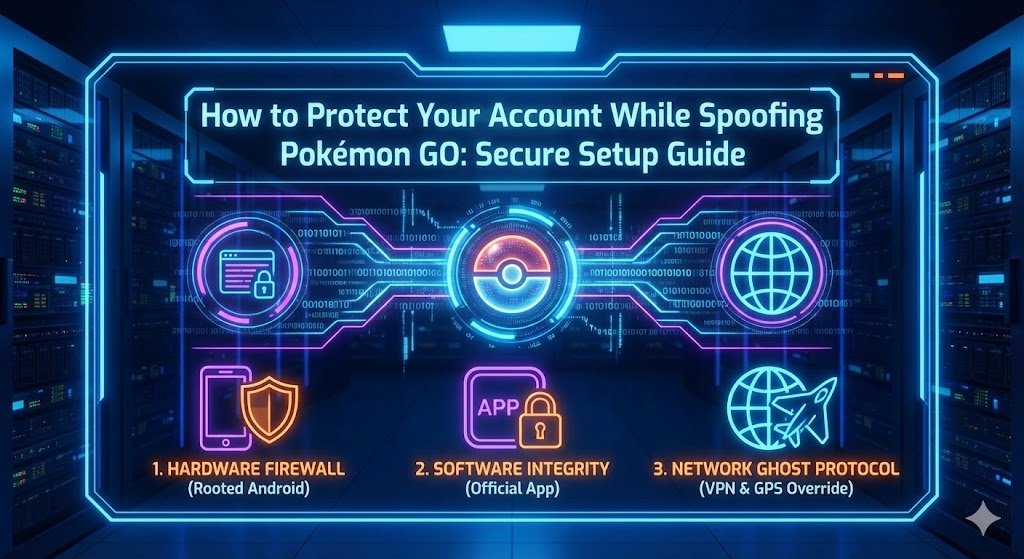
Security requires a multi-layered approach: Hardware, Software, and Network.
📍 Security Protocol Index
- 1. The Anatomy of a Ban: Signature vs. Heuristic
- 2. Understanding Ban Types: Strikes & Soft Bans
- 3. The "Hardware Firewall": Why Rooted Android Wins
- 4. The iOS Danger Zone: Why Apple Fails Security
- 5. Ghost Protocol: IP Masking & VPNs
- 6. Behavioral Science: Beating the AI
- 7. The "Account Air-Gap" Strategy
- 8. Frequently Asked Questions (FAQ)
The Anatomy of a Ban: Signature vs. Heuristic
To truly understand How to Protect Your Account While Spoofing Pokémon GO, you must understand how Niantic hunts. Their anti-cheat system, built on the Niantic Wayfarer and Play Integrity backbone, operates on two distinct levels. It is no longer just about whether you teleport; it's about how your app interacts with the server. Knowing these levels is the first step in learning How to Protect Your Account While Spoofing Pokémon GO.
Level 1: Signature Detection (The "Instant Kill")
This is the most common cause of bans in 2026. When you log in, the server checks the "signature" of your game client.
- Official App: Signed by Niantic. Safe.
- Modified App (PGSharp/iPogo): Signed by a 3rd party. Unsafe.
If you are using a modified app, you are flagged immediately. There is no behavioral workaround for this. You cannot "play safe" on a modified app because the app itself is the violation. For a detailed breakdown of which specific software is currently blacklisted, read our deep dive on Top Pokémon GO Spoofing Apps to Avoid in 2025.
Level 2: Heuristic/Behavioral Analysis (The "Slow Kill")
If you pass the signature check (by using a Rooted Phone with the official app), you face Level 2. This is an AI system that looks for "impossible" statistics. It analyzes your movement speed, catch ratios, and travel times.
- Catching 1,000 Pokémon in 1 hour (Impossible for humans).
- Throwing 100% "Excellent" throws for 3 days straight (Bot behavior).
- Walking exactly 9.8km/h in a straight line for 24 hours without stopping.
Learning How to Protect Your Account While Spoofing Pokémon GO means defeating Level 2 by acting like a human, not a machine.
Understanding Ban Types: Strikes & Soft Bans
Many players confuse "Soft Bans" with "Strikes." It is vital to know the difference so you can react appropriately if your account behaves strangely. A crucial part of knowing How to Protect Your Account While Spoofing Pokémon GO is recognizing these warning signs early.
| Ban Type | Symptoms & Duration |
|---|---|
| Soft Ban (Cooldown) | Duration: 1 minute to 2 hours. Effect: Pokémon flee instantly, Pokéstops spin but give no items. Cause: Teleporting too far without waiting. This is NOT a strike, but frequent triggers can lead to one. |
| Strike 1 (Shadow Ban) | Duration: 7 Days. Effect: You receive a "Warning" message. Rare Pokémon do not spawn. You cannot receive EX passes. Cause: Detection of modified software or extreme botting behavior. |
| Strike 2 (Suspension) | Duration: 30 Days. Effect: You cannot log in at all. The screen will say "Account Suspended." Cause: Continuing to cheat after Strike 1. |
| Strike 3 (Termination) | Duration: Permanent. Effect: Game Over. Your account data is deleted or permanently locked. Cause: Ignoring previous warnings. |
The "Hardware Firewall": Why Rooted Android Wins
The only way to defeat Level 1 (Signature Detection) is to use the official app from the Play Store. But the official app has no joystick. This is why we must use a **Rooted Android Device** as the foundation of any plan on How to Protect Your Account While Spoofing Pokémon GO.
Think of a Rooted Android as a "Hardware Firewall." By rooting the device and installing the GPS Joystick as a system-level driver, we separate the cheat from the game.
The Protection Logic:
1. The Game Client asks the OS: "Where am I?"
2. The OS (controlled by Root) replies: "New York City."
3. The Game Client reports "New York City" to Niantic.
Because the game client itself is untouched, it passes all signature checks. This is the fundamental pillar of How to Protect Your Account While Spoofing Pokémon GO. For more hardware specifics, read our guide on Safe Pokémon GO Spoofing Devices for 2026.
The "Play Integrity" Bypass
Simply rooting isn't enough; you must hide the root. We use a specific stack of modules to ensure your phone passes Google's "Play Integrity" check, which Pokémon GO uses to sniff out cheaters. This technical step is vital for anyone studying How to Protect Your Account While Spoofing Pokémon GO.
- Magisk/KernelSU: Grants root access systemlessly (without altering the /system partition).
- PlayIntegrityFix / TrickyStore: These are critical modules for 2026. They spoof the device's hardware fingerprint, telling Google that your unlocked, rooted Pixel 7 is actually a locked, stock, safe device.
- LSPosed: A framework that allows us to hide "Mock Locations" from the game entirely.
🛡️ Secure Your Hardware
Building this "Hardware Firewall" requires unlocking bootloaders and managing complex Magisk modules. If you want guaranteed security without the coding headache, we provide Pre-Rooted Google Pixels configured with the latest Play Integrity bypasses.
The iOS Danger Zone: Why Apple Fails Security
We see countless bans from users asking How to Protect Your Account While Spoofing Pokémon GO on an iPhone. The harsh reality of 2026 is that iOS is inherently insecure for spoofing.
Apple's "walled garden" ecosystem prevents system-level modifications. This forces users into dangerous corners like modified IPAs (iPogo) or unstable tethering methods (iAnyGo). These methods fail because they either break the app signature or leak "Developer Mode" flags to Niantic. Relying on them is the opposite of knowing How to Protect Your Account While Spoofing Pokémon GO.
The Pro Strategy: If you are an iPhone user who values your account, the best protection is platform separation. Keep your iPhone for calls, banking, and legit play. Buy a dedicated, cheap Rooted Android solely for spoofing. This "Air Gap" ensures that no trace of spoofing software ever touches your main daily device.
🍏 Privacy Accessories & Upgrades
If you prefer to stay on iOS, your options are limited. We recommend focusing on privacy accessories like Faraday Bags to block tracking when you aren't playing. Check our official eBay store for our full inventory of privacy gear.
Ghost Protocol: IP Masking & VPNs
You have the hardware. You have the app. But you have a leak: **Your IP Address**. This is a critical vector for Heuristic Detection and a key component of How to Protect Your Account While Spoofing Pokémon GO.
If you are virtually in Tokyo (GPS) but physically in London (IP Address), you are creating a data mismatch log. While one instance won't ban you, a history of 500 mismatches triggers a manual review. To fully answer How to Protect Your Account While Spoofing Pokémon GO, you must synchronize your digital footprint.
🔒 Mandatory: GPS Override & Kill Switch
We recommend **Surfshark VPN** because it is the only tool with a native "GPS Override" feature on Android. It forces your phone's GPS to match the VPN server location. Additionally, Surfshark's **Kill Switch** ensures that if your VPN drops, your internet cuts out instantly-preventing your real IP from leaking to Niantic's servers even for a millisecond. Activate Ghost Protocol (82% Off)
Behavioral Science: Beating the AI
The final layer of protection is YOU. The most secure phone in the world cannot save you if you play recklessly. Here are the Golden Rules of behavior for anyone mastering How to Protect Your Account While Spoofing Pokémon GO:
What Actually Triggers Cooldown?
Many players get banned because they don't understand what actions trigger the cooldown timer.
- TRIGGERS Cooldown: Throwing a ball (even if you miss), Spinning a stop, Feeding a berry, Fighting a Gym.
- DOES NOT Trigger Cooldown: Teleporting (you can jump anywhere as long as you don't interact), Checking a Pokémon (Shiny Checking), Evolving, Trading, Transferring items.
Knowing this difference allows you to "Shiny Check" across the globe without ever triggering a timer.
💤 The Sleep Cycle
Bots don't sleep. Humans do. Ensure your account is offline for at least 6-8 hours a day. 24/7 activity is a guaranteed flag.
✈️ Real Travel Times
Respecting the 2-hour cooldown is not enough. If you jump from NYC to London, wait 7 hours (real flight time) before logging in. This lowers your heuristic score.
🚫 No Snipe-Hunting
Teleporting every 5 minutes to catch a 100 IV Pokémon creates a "star pattern" on the map that is physically impossible. Stay in one city per day.
The "Account Air-Gap" Strategy
For players with accounts worth thousands of dollars (Level 50, 2016 Start Date), the ultimate answer to How to Protect Your Account While Spoofing Pokémon GO is the "Firewall Strategy".
Step 1: Buy a Rooted Android Device.
Step 2: Create a BRAND NEW account (The "Mule").
Step 3: Spoof aggressively on the Mule account. Catch Shinies, raid globally, farm dust.
Step 4: Become Best Friends with your Main Account.
Step 5: When you are physically together with your spoofing phone, trade the valuable Pokémon from the Mule to the Main.
If the Mule gets banned, you lose nothing but a disposable email address. Your Main account remains pristine, having never logged into a spoofing device. This is the only 100% guarantee in the game for those seriously asking How to Protect Your Account While Spoofing Pokémon GO.
Frequently Asked Questions (FAQ)
Secure Your Legacy Today
You have two choices: Continue gambling with free apps and wait for the ban screen, or invest in a professional security setup. The cost of a dedicated spoofing phone is insurance for your digital collection. Get Your Secure Phone Now


One thought on “How to Protect Your Account While Spoofing Pokémon GO (2026 Guide)”